


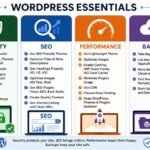
You Can Master WordPress Independently with Confidence and Ease!
April 22, 2026WordPress in 2026: Still Strong and Growing
April 24, 2026
LEARN WORDPRESS ON YOUR OWN
You can learn WordPress on your own. And not just learn it. You can get good enough to build full, professional sites without a class. Thousands of students, freelancers, bloggers, and business owners have taught themselves WordPress. They did it by practicing, poking around, and using free resources.
WordPress is set up for self-learners. The dashboard is simple. The visual editor, themes, and plugins make things obvious. There’s also a huge support community. If you have a computer, an internet connection, and the patience to try stuff, you already have what you need.
This guide explains why WordPress works for self-learners, what to learn step by step, how to practice, common mistakes, ways to improve, and how the skill can turn into real opportunities.
Introduction:
Why self-learning WordPress is realistic
Lots of people think building websites means coding and formal training. That’s true for traditional web development. WordPress is different. It removes many technical barriers so you can focus on content, page design, and features you add visually.
Self-learning works because WordPress lets you:
– Learn by doing, not just reading
– See results right away after each change
– Try things without breaking everything
– Undo or fix mistakes easily
– Find endless free tutorials and guides
Understanding what WordPress really is
WordPress is a Content Management System. It helps you create, manage, and publish stuff on the web without building everything from scratch.
With WordPress you can make blogs, business sites, portfolios, news sites, educational sites, online stores, and personal sites. Knowing it can do all that makes you want to try more.
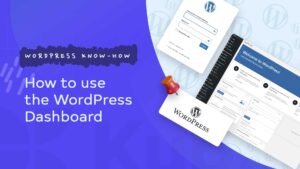
The beginner-friendly dashboard:
Log in and you’ll see a clean dashboard with menus like Posts, Pages, Media, Appearance, Plugins, Users, Settings. Each menu is named so you can click and figure out what it does in minutes. That design nudges you to explore. Exploration is the core of self-learning.
No coding barrier in WordPress:
A big beginner fear is coding. WordPress cuts that fear down.
You can change the look with themes. Add features with plugins. Build pages with blocks. Tweak layout visually. If you later want to learn code, WordPress still supports that. But you don’t need code to get started.
Setting up a free practice environment:
You can practice WordPress on your own machine with a local server, on cheap hosting, or on test websites. That freedom means you can try things, break them, and fix them without pressure. Mistakes turn into lessons.
Learning by exploring the dashboard:
Spend time clicking everything. Create a post. Upload an image. Change a setting. Install a theme. Add a menu. Every click teaches something. Playing around often beats memorizing theory.
Creating your first pages and posts:
Start small. Make a home page, an about page, a contact page, and a few blog posts. You’ll pick up formatting, images, categories, tags, and layout. That’s where real learning starts.
Themes. Learn design without theory:
Themes control how a site looks. Try a few. You’ll notice layout patterns, color choices, font styles, header and footer setups, and how homepages are built. You learn design by watching and testing.
Plugins. Understand website features:
Plugins add things like contact forms, SEO tools, security, backups, speed tweaks, and galleries. Installing and configuring plugins shows how sites work behind the scenes.
Menus, widgets, and the customizer:
These teach navigation, sidebar and footer content, logos, and site identity. You start thinking like someone building a website.
Learning content management:
You learn how to organize information. Categories and tags. Featured images. The media library. Page hierarchy. These skills transfer to other platforms too.
Learning SEO naturally:
While you work you’ll pick up keywords, meta descriptions, clean URLs, and image alt text. These are basic web skills now.
Learning security and backups:
You’ll practice updating WordPress, using security tools, making backups, and restoring sites. You learn how to protect your work.
Learning performance optimization:
You’ll learn about image optimization, caching, picking lightweight themes, and speed testing. You’ll see why site speed matters.
Project-based learning. The most powerful method
Build small projects:
- A personal blog
- A portfolio site
- A business layout
- A magazine-style homepage
- A landing page
Each project teaches something new.
Using free online resources:
When you get stuck, search. Tutorials, videos, and forum answers appear fast. That makes independent learning much easier.
Building confidence through trial and error:
You will break things. Wrong settings, funky layouts, plugin conflicts. Fixing those problems builds real confidence and problem-solving skill.
Step-by-step self-learning plan:
Week 1. Install WordPress. Learn the dashboard, posts, and pages.
Week 2. Try themes, customization, and menus.
Week 3. Look at plugins, basic SEO, security, and backups.
Week 4. Build a complete demo website.
Common challenges and how to deal with them
– Confusing settings — explore slowly
– Design you don’t like — try a new theme
– Errors after plugins — deactivate and test
– Slow site — optimize images and add caching
Turning practice into skill
After a few practice sites you’ll recognize layouts fast, know which plugins to use, build pages quicker, and fix common issues without panic.
From learning to earning:
You can build sites for others, offer maintenance, try freelancing, or help small businesses.
Why WordPress is great for students and beginners
No technical background required. Learn at your own pace. Mostly practical work. Creative and a bit fun.
Developing a learning habit:
Spend an hour or two a day. Test one new feature. Build a page. Try a plugin. Small daily steps beat long, infrequent sessions.
Observing other websites:
Visit WordPress sites and ask yourself which theme they use, how the menu is arranged, and what features are visible. Observation speeds learning.
Rebuilding websites for practice
Try to recreate a site you like. It’s excellent training for layout and structure.
Learning advanced customization, optional
Later you can learn some CSS, use page builders, or dig into theme settings. Do that once you’re comfortable.
The role of patience:
Self-learning takes patience. Some days nothing works. Those days teach the most.
Continuous updates keep you learning
WordPress changes. Updates add new features. You keep growing as you use it.
The joy of creating something real
Seeing your site live feels good. That feeling keeps you going.
Final thoughts:
Learning WordPress on your own is realistic. It’s affordable and rewarding. With curiosity, practice, and consistency you can become skilled without a classroom. You start by clicking buttons. You end up building complete sites with confidence. Yes. You can learn WordPress on your own, and you can really master it.
